

WordPress 随机文章时间
某些情况下,发表WordPress文章时不想让发表时间按当前的时间显示而是随机的,可以参考下面的代码。 将代码
某些情况下,发表WordPress文章时不想让发表时间按当前的时间显示而是随机的,可以参考下面的代码。
将代码添加到当前主题函数模板functions.php中:
复制代码
/** * 在指定时间范围内随机设置文章发布时间 * * @param int $post_id 文章ID * @param string $start_date 开始日期 (格式: Y-m-d H:i:s) * @param string $end_date 结束日期 (格式: Y-m-d H:i:s) */function set_random_post_date( $post_id, $start_date, $end_date ) { // 将日期字符串转换为时间戳 $start_timestamp = strtotime( $start_date ); $end_timestamp = strtotime( $end_date ); // 生成随机时间戳 $random_timestamp = rand( $start_timestamp, $end_timestamp ); // 转换为MySQL日期时间格式 $random_date = date( 'Y-m-d H:i:s', $random_timestamp ); // 直接使用数据库更新以提高性能 global $wpdb; $wpdb->update( $wpdb->posts, array( 'post_date' => $random_date, 'post_date_gmt' => get_gmt_from_date( $random_date ), ), array( 'ID' => $post_id ), array( '%s', '%s' ), array( '%d' ) );} /** * 批量设置文章随机发布时间 */function batch_set_random_post_dates() { $args = array( 'post_type' => 'post', 'posts_per_page' => -1, ); $posts = get_posts( $args ); foreach ( $posts as $post ) { $start_date = get_option( 'start_date', '2023-01-01 00:00:00' ); $end_date = get_option( 'end_date', '2025-05-17 23:59:59' ); set_random_post_date( $post->ID, $start_date, $end_date ); }} // 添加管理菜单add_action( 'admin_menu', function () { add_options_page( '随机发布时间设置', '随机发布时间', 'manage_options', 'random-post-dates', function () { // 保存设置并执行批量设置 if ( isset( $_POST['save_and_set'] ) ) { // 保存设置 update_option( 'random_post_date_start', sanitize_text_field( $_POST['start_date'] ) ); update_option( 'random_post_date_end', sanitize_text_field( $_POST['end_date'] ) ); update_option( 'random_post_date_enabled', isset( $_POST['enabled'] ) ? '1' : '0' ); update_option( 'random_post_date_update_enabled', isset( $_POST['update_enabled'] ) ? '1' : '0' ); // 执行批量设置 batch_set_random_post_dates(); echo '<div class="updated"><p>设置已保存</p></div>'; } // 获取当前设置 $start_date = get_option( 'random_post_date_start', '2023-01-01 00:00:00' ); $end_date = get_option( 'random_post_date_end', '2025-05-17 23:59:59' ); $enabled = get_option( 'random_post_date_enabled', '1' ); $update_enabled = get_option( 'random_post_date_update_enabled', '0' ); ?> <div class="wrap"> <h2>随机发布时间设置</h2> <form method="post"> <table class="form-table"> <tr> <th scope="row">新文章随机时间</th> <td> <label> <input type="checkbox" name="enabled" value="1" <?php checked( $enabled, '1' ); ?>> 启用 </label> </td> </tr> <tr> <th scope="row">更新文章随机时间</th> <td> <label> <input type="checkbox" name="update_enabled" value="1" <?php checked( $update_enabled, '1' ); ?>> 启用 </label> </td> </tr> <tr> <th scope="row">开始时间</th> <td> <input type="text" name="start_date" value="<?php echo esc_attr( $start_date ); ?>" class="regular-text"> <p class="description">格式:YYYY-MM-DD HH:mm:ss</p> </td> </tr> <tr> <th scope="row">结束时间</th> <td> <input type="text" name="end_date" value="<?php echo esc_attr( $end_date ); ?>" class="regular-text"> <p class="description">格式:YYYY-MM-DD HH:mm:ss</p> </td> </tr> </table> <p class="submit"> <input type="submit" name="save_and_set" class="button-primary" value="保存设置"> </p> </form> </div> <?php } ); }); // 修改发布和更新文章时的随机时间设置add_action( 'transition_post_status', function ( $new_status, $old_status, $post ) { // 检查是否为文章类型 if ( $post->post_type !== 'post' ) { return; } // 检查是否为发布或更新操作 if ( $new_status === 'publish' ) { // 如果是从非发布状态到发布状态(新发布) if ( $old_status !== 'publish' ) { // 检查新发布功能是否启用 if ( get_option( 'random_post_date_enabled', '1' ) === '1' ) { $start_date = get_option( 'random_post_date_start', '2023-01-01 00:00:00' ); $end_date = get_option( 'random_post_date_end', '2025-05-17 23:59:59' ); set_random_post_date( $post->ID, $start_date, $end_date ); } } // 如果是已发布文章的更新 else { // 检查更新时随机时间功能是否启用 if ( get_option( 'random_post_date_update_enabled', '0' ) === '1' ) { $start_date = get_option( 'random_post_date_start', '2023-01-01 00:00:00' ); $end_date = get_option( 'random_post_date_end', '2025-05-17 23:59:59' ); set_random_post_date( $post->ID, $start_date, $end_date ); } } } }, 10, 3);
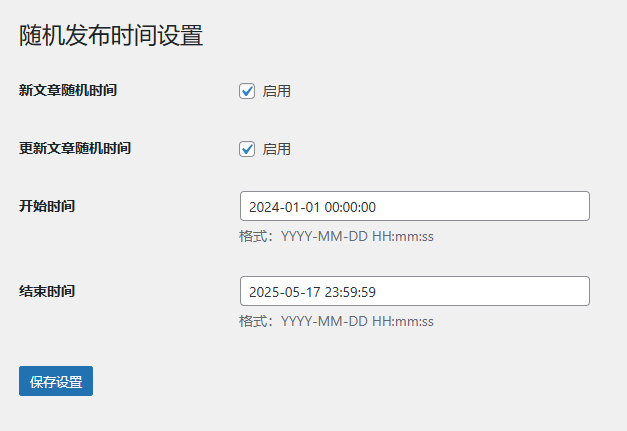
之后进入设置 → 随机发布时间设置,可以分别设置新发表文章或更新文章时随机时间。
本站文章大部分为原创,用于个人学习记录,可能对您有所帮助,仅供参考!

暂无评论
欢迎发表您的观点和想法
发表评论